

Introduction
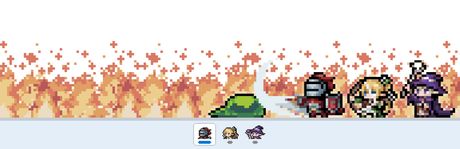
TBH: Task Bar Hero is a small idea executed with a wink: an idle RPG that lives in your Windows taskbar and keeps grinding while you do your actual work. Despite that modest premise, it has found a big audience, sitting around 82,941 concurrent players with a peak of roughly 112K and 56.9 million hours played.
It works because it fits perfectly into the gaps of a normal day. You do not sit down to play TBH so much as let it hum along on a corner of the screen, checking in between emails, meetings and other games. For fans of number-goes-up progression, that steady background satisfaction is exactly the appeal.
Gameplay Mechanics
The core loop is classic idle RPG design. You hire heroes, they automatically battle waves of enemies, and the rewards let you upgrade them so they fight even faster. Because everything happens in a compact strip near the taskbar, the game stays out of the way while still showing you progress at a glance.
Progression revolves around prestige. At certain points you reset your run in exchange for permanent multipliers that make the next climb much quicker, and learning when to reset is the biggest strategic decision in the game. Between prestiges you tweak hero choices and upgrades, deciding whether to lean into active clicking or a more passive idle build.
There is not much more to it than that, and that is by design. The gameplay is intentionally minimal, closer to a desktop companion than a full RPG. Players who want deep combat or story will find it thin, but those who enjoy optimizing numbers in short bursts will find a surprisingly sticky loop that rewards a few minutes of thought here and there.
How to Play
After installing, let the game settle into your taskbar and spend your first session simply learning the interface. Hire early heroes, buy the cheapest upgrades, and watch how damage and income scale. You will quickly see which upgrades give the biggest jumps.
Before you commit to a long session of Game, clear the onboarding properly. Finish the tutorial or first mission without skipping dialogue that teaches a mechanic, then open settings and lock a stable frame rate. Remap awkward binds early — especially interact, sprint, inventory, and voice-chat push-to-talk if the game loop depends on them.
Your first two hours should prove one core loop, not every system at once. Treat this as the north star: After installing, let the game settle into your taskbar and spend your first session simply learning the interface. Hire early heroes, buy the cheapest upgrades, and watch how damage and income scale. You will quickly see which upgrades give the biggest jumps. Park secondary crafts, cosmetics, and side modes until that loop feels automatic. Most early rage-quits happen because players open five menus before they understand one.
When you stall, change a single variable and retry: loadout, route, difficulty, teammate role, or economy timing. Watch one short clip only for positioning or UI cues, then close it and practice. Screenshot useful maps/menus into a folder so you are not alt-tabbing every death.
End each session with a three-line note — what killed you, what resource you lacked, and the first experiment for next time. That habit turns Game from “too much info” into a climb you can feel week to week, whether you play solo or with friends.
Pros & Cons
- ✅ Runs while you work
- ✅ Cheap
- ✅ Prestige loops
- ❌ Minimal gameplay
- ❌ Niche joke
Conclusion
TBH: Task Bar Hero is a cheap, charming idle game that turns idle time into quiet progress. Its gameplay is minimal and its joke will not land for everyone, but as a second-monitor companion it does exactly what it promises, and it never demands more attention than you want to give.
It is perfect for idle game fans and anyone who wants something light running during work. Find it on Steam for less than a coffee.